
Necker cube simulation
TODO: convert sim to axon; currently only available in Leabra:
Open the necker-cube simulation in CCN Sims.
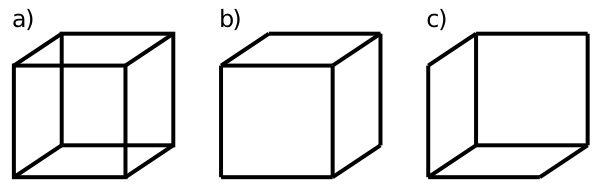
Figure 1: The Necker Cube
This simulation explores the use of constraint satisfaction in processing ambiguous stimuli. The example we will use is the Necker cube (Figure 1), which can be viewed as a cube in one of two orientations. People tend to oscillate back and forth between viewing it one way versus the other. However, it is very rare that they view it as both at the same time – in other words, they tend to form a consistent overall interpretation of the ambiguous stimulus. This consistency reflects the action of a constraint satisfaction system that favors interpretations that maximize the constraints imposed by the possible interpretations. Alternatively, we can say that there are two stable attractors, one for each interpretation of the cube, and that the network will be drawn into one or the other of these attractor states.
Dynamic attractors for constraint satisfaction
In the Network view, you can see two pools of neurons, each 2x4 in size, which represent the verticies of the necker cube, in pairs going up from the bottom. Each cube represents one of the two possible interpretations (the left cube corresponding to panel b and the right to panel c in the above figure). All of the units are within one overall inhibitory pool within the layer, and the inhibition is strong enough such that only one of the two cubes can be active at any given time.
- • As usual, let’s examine the weights (select
Wts / r.Wt, click on the units).
Notice that each unit is connected to its local neighborhood of vertices. Thus, when one vertex gets active, it will tend to activate the others, leading to the activation of a consistent interpretation of the entire cube. However, at the same time, the other interpretation of the cube is also activating its vertices, and, via the inhibition, competing to get active.
- • Return to viewing
Actin the network, and we’ll run it. PressInitin the toolbar and setSteptoCycleinstead ofTrialandStepthrough the settling process, to view the competition process in action. This will allow you to see the network evolve over time within a trial (otherwise it happens too quickly to see). You can also set the number next to Cycle to e.g., 5 to step 5 cycles at a time so you don’t have to click through every single cycle.
During running, both interpretations receive equal but weak amounts of excitatory input. You should see that as the network settles there is some flickering of the units in both cubes, with some wavering of strength back and forth until one cube eventually wins out and is fully active while the other remains inactive.
- • Set
Stepback toTrialandStepseveral more times, to see which way it tends to go.
You should note that which cube wins is random. If you are persistent, you might eventually observe a case where part of each cube is activated, instead of one entire cube being active and the other not (warning, this could take hundreds of tries, depending on how fortuitous your random seeds are). When this happens, note the plot of the Harmony value in the Test Cycle Plot. It should be substantially below all the other traces that correspond to a consistent solution on one cube. Thus, an inconsistent partial satisfaction of the weight constraints has lower harmony than full satisfaction of the constraints in one cube.
Noise added to the membrane potential is playing an important role in this simulation – without it, there is nothing to “break the tie” between the two cube interpretations. To see this, let’s manipulate the level of noise.
- • Try the following values of
Noisein the control panel: 0, .1, .01, .001. (Be sure to hitInitafter changing this noide parameter to ensure it takes effect).
Report what differences you observed in the settling behavior of the network for the different values of noise (0, .1, .01, .001), and explain what this tells you about how noise is affecting the process
Finally, one of the important psychological aspects of the Necker cube stimulus is that people tend to oscillate between the two possible interpretations. This probably occurs because the neurons that are activated for one interpretation get tired eventually, allowing the other competing units to become active. This process of neurons getting tired is called accommodation or adaptation, and is a well established property of neurons that was covered in the Neuron of the textbook.
- • To turn on adaptation, click the
KNaAdaptbutton On, and also set theCyclesbelow that button to 1000 instead of 100 (gives it more cycles to run so you can see the effects). ClickStep. You can use the Time VCR buttons to review how the activation states changed over time. Also check out theTest Cycle Plotfor the graph of Harmony over time which shows the oscillations.
You should observe a few oscillations from one cube to the next as the neurons get tired.